> For the complete documentation index, see [llms.txt](https://docs.whereby.com/llms.txt). Markdown versions of documentation pages are available by appending `.md` to page URLs; this page is available as [Markdown](https://docs.whereby.com/whereby-product-features/file-sharing.md).
# File sharing
File sharing allows meeting participants to exchange small files with each other, during the session, through the chat.
## Summary
File sharing is a feature of Whereby's chat and allows all participants in a video session to attach media files (images, documents, audio, and video) of up to 15 MB. Files are available for download throughout the session, making it easier to collaborate and share resources in real-time.
{% hint style="warning" %}
Files are available for download for the duration of the session *only*. All files are encrypted and securely stored in Whereby-managed cloud storage, and are **automatically deleted** within 1 minute from the end of the session. They are not backed up and cannot be retrieved after the session.
{% endhint %}
## How does it work?
When file sharing is enabled, any session participant can attach files from their computer, using a file picker or drag and drop into the chat. Each file is presented in the chat window as an individual message and all session participants can download them. Hosts are able to delete any file shared, removing any unnecessary or incorrect files to keep the session organized.
### Supported file types
The following file types can be uploaded:
* **Images**: JPEG, PNG, GIF, WEBP
* **Documents**: PDF, DOCX, TXT, RTF, CSV, XLSX
* **Audio**: MP3, WAV
* **Video**: MP4, MOV, MKV, WEBM
### Maximum file size
An individual file cannot exceed 15MB, which is sufficient for most documents and media while maintaining optimal session performance.
## Setup
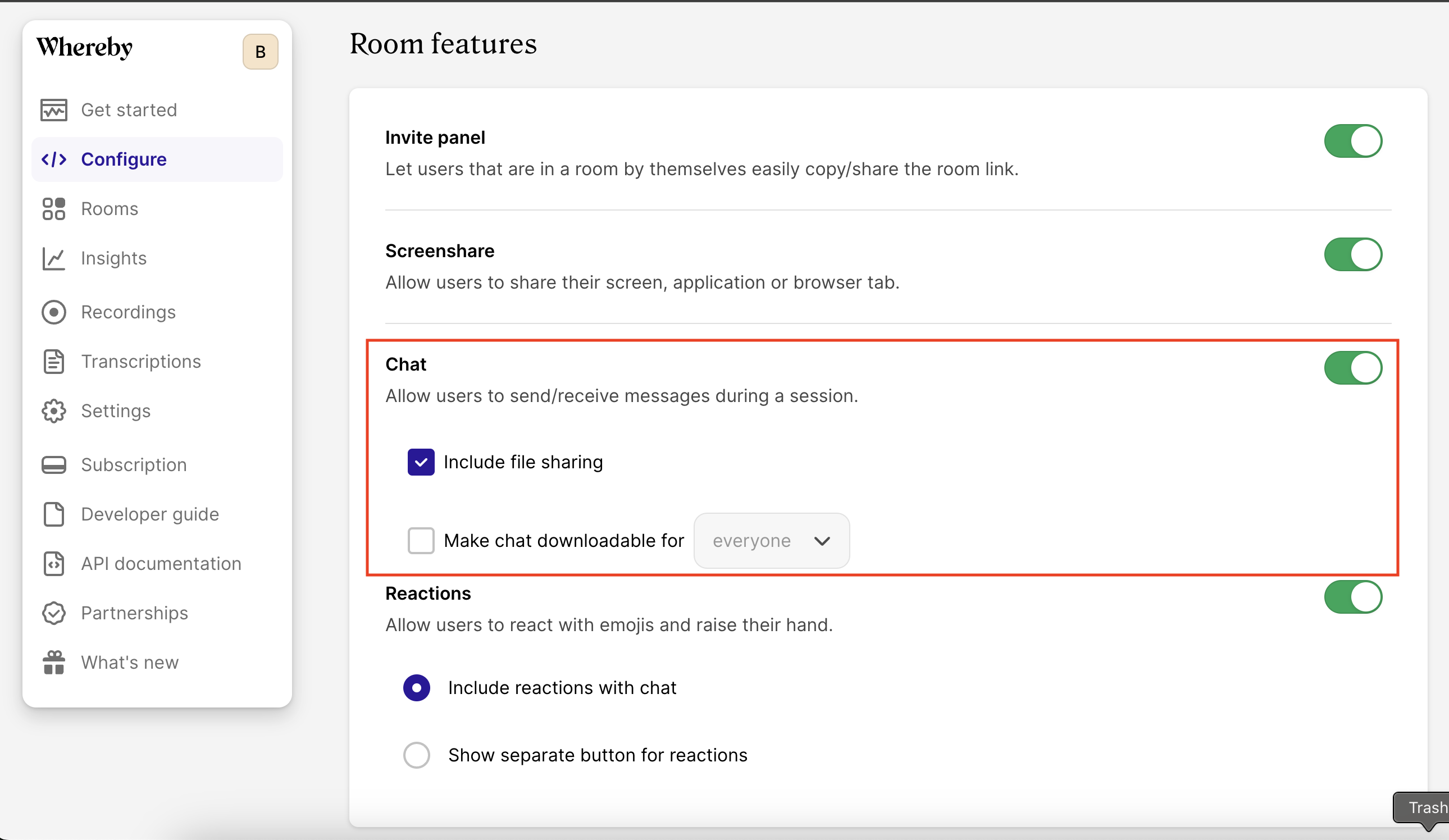
By default, file sharing is enabled globally for your account and will be available in all sessions where chat is enabled. You can change the availability of file sharing globally or per room.
### Global configuration
Go to the "**Configure" → "Features"** section of your Dashboard to disable or enable file sharing for all of your sessions.
{% hint style="success" %}
Chat *must be* enabled for file sharing to work. You can enable chat for all rooms on the Dashboard or per room.
{% endhint %}
Global configuration of file sharing
### Per room configuration
You can override global configuration for individual rooms via the API during a [room creation](/reference/whereby-rest-api-reference/meetings.md#post-meetings) request or with an [attribute or parameter](/whereby-for-web-browser/web-component-and-pre-built-ui/configuring-with-attributes.md) of `fileSharing=`.
## Additional Information
### HIPAA compliance
File sharing is considered to be [HIPAA compliant](/telehealth-industry-solutions/hipaa-compliant-setup.md), as files are securely stored and only available to the participants for the duration of the session.
All files are permanently deleted within 1 minute from the end of the session or from the moment when there is only 1 participant left in the room.
## Known Limitations
1. Files can only be attached when there are at least two participants in the session, ensuring that the sharing feature is used for its intended collaborative purpose.
2. File sharing is available in both room modes - P2P rooms called 'normal' and SFU rooms called 'group'. However, please note that in both room modes, the files being shared are temporarily stored in Whereby-managed cloud storage. [Learn more about P2P and SFU video sessions.](https://whereby.com/blog/p2p-vs-sfu-video-calls-which-is-best/)