> For the complete documentation index, see [llms.txt](https://docs.whereby.com/llms.txt). Markdown versions of documentation pages are available by appending `.md` to page URLs; this page is available as [Markdown](https://docs.whereby.com/whereby-for-web-browser/react-based-browser-sdk/grid-logic.md).
# Grid logic
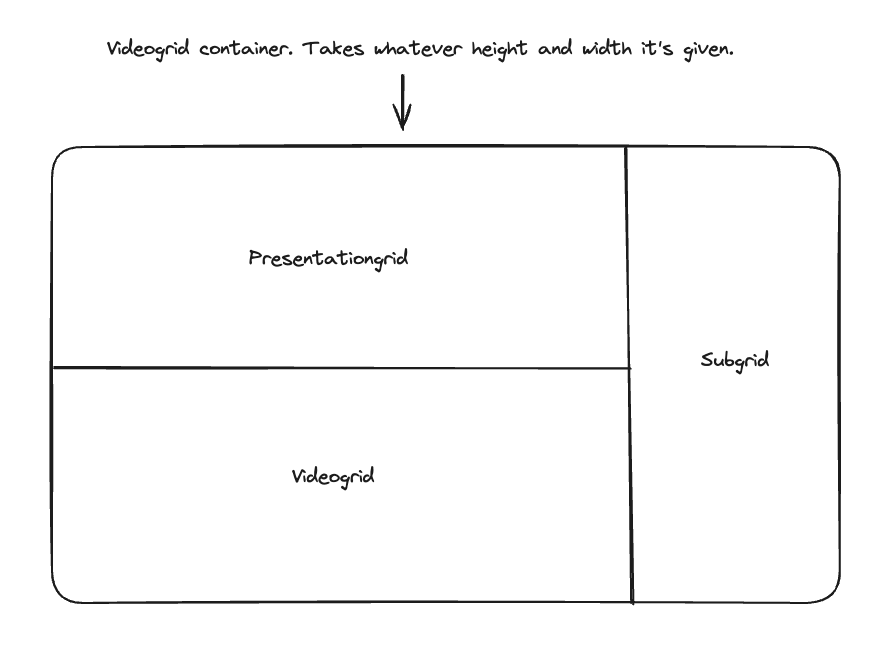
The `` component is simple to use, but it contains a set of complex rules that decide how the various video cells are rendered.
## Layouts
The `` component consists of three specific grid layouts:\
`Presentationgrid`, `Videogrid` and `Subgrid`.
The placement of the grids will change depending on container size, number of presentations and number of participants in the video and subgrid. For example, if there are no active presentations, the video grid will fill the presentation space. The same rule applies to the subgrid.
## Participant distribution
The selection of which participants reside in which grid section is decided based on a set of rules:
### Presentationgrid
The presentation grid consists of all screen shares and spotlighted participants.
### Videogrid
The video grid consists of all participants that have enabled video, are not spotlighted, and are not in the subgrid. By default, the `Videogrid` can have 12 active video cells. However, this is can be customised.
### Subgrid
The general rule is that all participants with their video off, will move to the subgrid. Any participant joining after the video limit in the `Videogrid` is reached, will also be automatically moved into the subgrid.
## Room integrations
When someone shares a YouTube video or a Miro board, `` places it like a cell and shows it in an iframe. You can draw the cell yourself with [`renderIntegration`](/reference/react-hooks-reference/videogrid.md#rendering-room-integrations), or turn this off with `enableIntegrations={false}`.
* The first running integration takes the `Presentationgrid`. While it's there, spotlighted participants move to the `Videogrid` instead of sharing the stage with it.
* Any further running integrations go to the `Subgrid`.
* Maximizing a participant gives them the stage. The integration stays mounted in a hidden cell, so a video keeps playing, and it returns to the stage when the participant is restored. The same happens to extra integrations when the subgrid is turned off.
* An integration cell takes the content's aspect ratio, 16:9 by default.
An iframe reloads when React moves it in the DOM, so the grid always renders integration cells first in its list, with a key built from the session id. Participants joining, leaving or getting spotlighted don't move them. See [Sharing YouTube and Miro](/whereby-for-web-browser/react-based-browser-sdk/sharing-youtube-and-miro.md) for the full feature.